
7 Production RAG Patterns That Actually Work
Battle-tested production RAG patterns and best practices that separate real systems from demos. Hybrid search, re-ranking, eval pipelines, and more.

These patterns come from building and maintaining real RAG systems, including AskMGM's pipeline across 45 city datasets. Most RAG advice online doesn't survive contact with real data.
Most RAG tutorials get you to a working demo in 20 minutes. Embed some documents, search a vector database, stuff chunks into a prompt, generate. It works on your laptop with your test questions. Then you deploy it and everything falls apart.
Users ask questions differently than you imagined. The retriever pulls irrelevant chunks. The LLM hallucinates with full confidence. Responses are slow. Nobody trusts the answers. The "it works on my machine" moment of AI engineering.
The gap between a RAG demo and a RAG system that people actually rely on is enormous. It's not about picking the right vector database or the fanciest embedding model. It's about the patterns you build around the core retrieve-and-generate loop.
Here are seven patterns we've seen make the biggest difference in production RAG systems. None of them are theoretical. All of them come from building and maintaining real systems that real people use every day.
1. Hybrid Search: Vector + Keyword
Vector search is the default retrieval method in every RAG tutorial. Embed the query, find the nearest neighbors, done. And for many queries, it works well. Semantic search is genuinely powerful, it understands that "how do I cancel my subscription" and "stop billing my account" are the same question even though they share almost no words.
But vector search has a blind spot that will bite you in production: exact matches.
When a user searches for "error code E-4012" or "section 7.3.2 of the compliance policy" or a specific product SKU, vector search often fails. It's looking for semantic similarity, not lexical matches. The embedding for "E-4012" isn't necessarily close to the embedding of the chunk that contains "E-4012" because the meaning of an error code is opaque to the embedding model.
Keyword search (BM25) handles these cases perfectly. It's been doing this for decades. Term frequency, inverse document frequency, exact matching. Not glamorous, but reliable when you need a precise hit.
The pattern is straightforward: run both searches in parallel, then merge the results. The standard merging technique is reciprocal rank fusion (RRF): each result gets a score based on its rank in each list, and you combine the scores to produce a final ranking. It's simple, doesn't require training, and consistently outperforms either search method alone.
Implementation hint: Most vector databases now support hybrid search natively. Pinecone, Weaviate, and Qdrant all offer built-in keyword + vector search with fusion. If yours doesn't, run BM25 separately (Elasticsearch, OpenSearch, or even SQLite FTS) and merge results in your application code.
2. Chunking Strategy Matters More Than Your Embedding Model
This is the pattern that gets the least attention and has the biggest impact. Everyone obsesses over which embedding model to use, OpenAI's text-embedding-3-large or Cohere's embed-v4 or some new open-source contender. Meanwhile, they're feeding those models garbage.
The default chunking approach in most tutorials is character-based or token-based splitting. Take the document, split every 500 tokens, add some overlap, embed each chunk. It's simple and it's terrible.
Here's what happens: a chunk boundary lands in the middle of a paragraph. The first half of an important explanation ends up in one chunk, the second half in another. Neither chunk contains the complete answer. The retriever pulls half the information, and the LLM either hallucinates the rest or gives an incomplete response.
Chunk by semantic boundaries. Headings, sections, paragraphs, list items, code blocks. These are natural units of information that humans already created when they wrote the document. Use them.
For structured documents (technical docs, help articles, policy documents), split on headings. Each section becomes a chunk. If a section is too long, split it at paragraph boundaries within the section. For unstructured text (emails, transcripts, support tickets), use paragraph breaks or sentence-based chunking with a reasonable size target.
The second part of this pattern is equally important: include metadata with every chunk. Source document name, section title, page number, date, author, category. This metadata serves double duty, it enables filtered search (only search product documentation, not marketing materials) and it gives the LLM context about where the information came from.
Implementation hint: LangChain and LlamaIndex both have markdown and HTML splitters that respect heading structure. Use them instead of the default RecursiveCharacterTextSplitter. If your documents are PDFs, convert to markdown first (tools like Docling or Marker handle this well), then split on the resulting structure.
3. Query Transformation
Users don't type search queries into your chatbot. They type conversational questions. Often vague ones. Often ones that depend on context from earlier in the conversation.
"What about the enterprise plan?" is a perfectly normal thing for a user to say. It's also a terrible search query. What about the enterprise plan? Pricing? Features? Limitations? Compared to what?
Query transformation means having the LLM rewrite the user's conversational input into one or more effective search queries before retrieval happens. The model has the conversation history, it knows what the user is actually asking, and it can formulate a query that will actually pull the right chunks.
There are three flavors of this pattern:
Query rewriting. The simplest version. The LLM takes the user's message and the conversation context, and outputs a single optimized search query. "What about the enterprise plan?" in the context of a pricing discussion becomes "enterprise plan pricing features comparison."
HyDE (Hypothetical Document Embeddings). Instead of rewriting the query, the LLM generates a hypothetical answer to the question, and you embed that hypothetical answer as the search query. The intuition: a hypothetical answer is more semantically similar to the actual answer chunk than the question is. This sounds weird and it works surprisingly well.
Sub-query decomposition. For complex questions, break them into simpler sub-queries. "How does our enterprise plan compare to Competitor X on pricing, features, and support?" becomes three separate searches: enterprise plan pricing, Competitor X pricing comparison, enterprise plan support features. You retrieve for each sub-query independently and combine the results.
Implementation hint: Start with simple query rewriting, it's one additional LLM call with a short system prompt. Use a fast, cheap model for this step (GPT-4o-mini or Claude Haiku). It adds minimal latency and cost while dramatically improving retrieval quality. If you're using RAG as a tool, the LLM already does query formulation naturally when it constructs the tool call arguments, this is the same pattern you'd use when building MCP servers to give AI models direct access to your data.
4. Re-ranking
Here's a counterintuitive fact: retrieving more chunks and then re-ranking them outperforms retrieving fewer chunks directly, even when using the same embedding model.
The reason is that embedding-based retrieval uses bi-encoders. The query and the documents are encoded independently, then compared with a simple distance metric. This is fast, you can search millions of documents in milliseconds, but the quality ceiling is limited because the model never sees the query and document together.
Cross-encoder re-rankers work differently. They take the query and a document as input together, process them through a single model, and output a relevance score. Because the model sees both texts simultaneously, it can capture nuanced relationships that bi-encoders miss. The downside is speed: you can't run a cross-encoder over millions of documents.
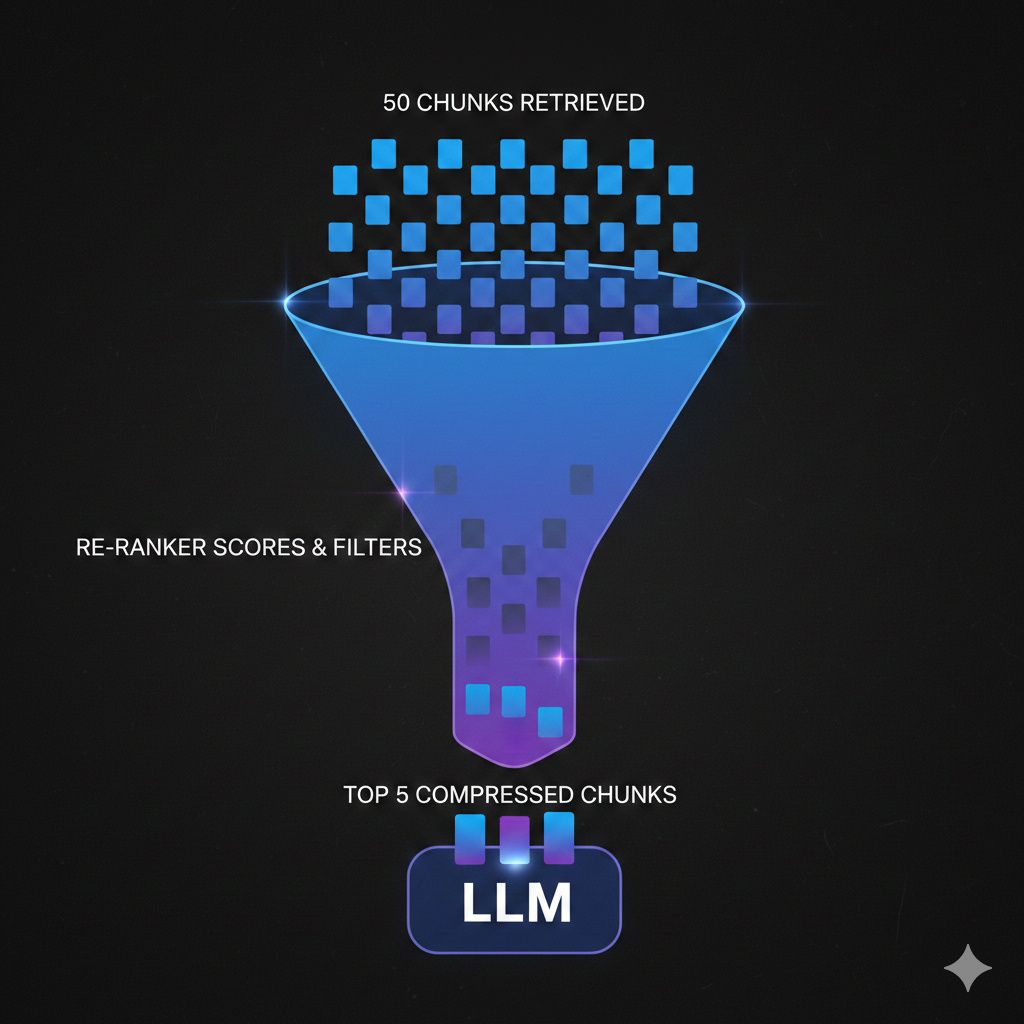
The pattern combines both approaches. Use fast bi-encoder retrieval to get a broad set of candidates (top 20-50), then use a cross-encoder re-ranker to score each one against the actual query. Pass only the top 5-10 to the LLM.
This two-stage approach gives you the speed of embedding search with the accuracy of cross-encoder scoring. In our experience, adding a re-ranker is the single highest-impact change you can make to an existing RAG system.
Implementation hint: Cohere Rerank and Jina Reranker are the easiest to integrate, single API calls that take a query and a list of documents and return re-ranked results. For self-hosted, BGE-reranker-v2 or the cross-encoder models from Sentence Transformers work well. The latency overhead is typically 100-200ms, which is acceptable for most use cases.
5. Contextual Compression
You've retrieved your chunks. You've re-ranked them. You're about to send them to the LLM. But each chunk is 300-500 tokens of text, and only a sentence or two within each chunk actually answers the user's question. The rest is surrounding context that helped during retrieval but is noise for generation.
Contextual compression means extracting or summarizing only the relevant parts of each retrieved chunk before injecting them into the LLM's context. Instead of sending five 400-token chunks (2,000 tokens of context), you send five compressed extracts totaling maybe 500 tokens.
This matters for three reasons.
Cost. Input tokens cost money. At 10,000 conversations per day, trimming 1,500 unnecessary tokens per conversation saves real money at scale.
Quality. Less noise means better answers. Research consistently shows that LLMs perform worse when relevant information is buried in irrelevant context. This is the "lost in the middle" problem, models pay less attention to information in the middle of long contexts. Shorter, more focused context avoids this entirely.
Speed. Fewer input tokens means faster time-to-first-token. For streaming responses, this directly improves perceived performance.
Implementation hint: The simplest approach is an LLM-based extractor, a fast model (GPT-4o-mini) that takes each chunk and the user's query, and returns only the relevant sentences. LangChain has a ContextualCompressionRetriever that wraps this pattern. For lower-latency alternatives, you can use an extractive approach: split each chunk into sentences, score each sentence against the query using a lightweight model, and keep only the top-scoring sentences.
6. Citation and Grounding
If users can't verify the answers your RAG system gives them, they won't trust it. And they shouldn't.
The pattern is simple in concept: make the LLM cite which chunks it used to generate each part of its response. Include source links, document names, section references, whatever helps the user trace an answer back to its origin.
This accomplishes three things. First, it builds trust. Users can click through to the source and verify the answer themselves. Second, it reduces hallucination. When you instruct the LLM to only make claims it can cite from the provided context, it becomes much more conservative about making things up. The instruction "only answer based on the provided sources, and cite each claim" is one of the most effective anti-hallucination prompts you can use. Third, it helps you debug. When an answer is wrong, the citations tell you whether the problem was retrieval (wrong chunks) or generation (right chunks, wrong interpretation).
The implementation has a nuance: you need to give each chunk a citable identifier before passing it to the LLM. Number them, label them with source names, give them IDs. Then instruct the model to reference those identifiers in its response.
A typical system prompt snippet looks like this: "Answer the user's question based only on the provided sources. Cite your sources using [Source N] notation. If the sources don't contain enough information to answer, say so."
Implementation hint: Pass chunks to the LLM with clear labels like [Source 1: Product Pricing Guide, Section 3.2] and instruct the model to use those labels. In the frontend, make citations clickable, link them to the original document or display the source chunk in a tooltip. This is a small UI investment that dramatically increases user confidence.
7. Evaluation Pipeline
This is the pattern that separates teams who are guessing from teams who are engineering.
You can't improve a RAG system through vibes. "It seems to be working better" is not a metric. You need an evaluation pipeline that measures concrete aspects of your system's performance, runs automatically, and tells you when things get better or worse.
A solid RAG eval pipeline measures three things:
Retrieval quality. Are you pulling the right chunks? Given a question, does the retriever return chunks that contain the answer? The standard metrics are recall@k (what percentage of relevant documents appear in the top k results) and precision@k (what percentage of returned documents are relevant). You need a test set of questions paired with the chunks that should be retrieved.
Answer accuracy. Does the generated answer actually answer the question correctly? This is harder to measure automatically. The most practical approach is LLM-as-judge: use a capable model (GPT-4o, Claude) to score whether the generated answer correctly addresses the question, given a reference answer. It's not perfect, but it correlates well with human judgment and scales to hundreds of test cases.
Faithfulness (groundedness). Does the answer stick to the provided context, or does the LLM inject information that isn't in the retrieved chunks? A response can be "correct" in a general sense but unfaithful to the sources, the model got the right answer from its training data rather than from your documents. This matters because training data goes stale but your documents (ideally) stay current. Measure faithfulness by checking whether each claim in the response can be traced to a retrieved chunk.
Build a test set of 50-100 question-answer pairs that represent your actual use cases. Run your eval pipeline after every meaningful change, new chunking strategy, different embedding model, updated re-ranker, changed prompts. Compare the numbers. Ship the version that scores better.
Implementation hint: RAGAS is the most popular open-source framework for RAG evaluation, it measures faithfulness, answer relevancy, and context precision out of the box. If you want something simpler, start with a spreadsheet of 50 questions and expected answers, and write a script that runs each question through your pipeline and uses an LLM to score the output. Scrappy but effective, and infinitely better than no evaluation at all.
The Patterns Work Together
These seven patterns aren't independent checkboxes. They compound.
Hybrid search gives you better initial retrieval. Better chunking means those retrieved results are coherent, self-contained units of information. Query transformation ensures you're searching for the right thing in the first place. Re-ranking filters the good results from the noise. Contextual compression removes the remaining noise within each chunk. Citations ground the final output and give you a debugging trail. And the eval pipeline tells you whether all of this is actually working.
You don't need to implement all seven on day one. Start with whatever is causing the most pain. If users are searching for specific codes or IDs and getting bad results, add hybrid search. If your answers feel unfocused, add re-ranking. If you have no idea whether your system is improving or regressing, build the eval pipeline first.
But if you're building a RAG system that needs to work in production, not just impress people in a demo, these are the patterns that get you there. We've seen it across dozens of builds. The teams that invest in these fundamentals ship systems that users actually trust and rely on. The teams that skip them ship demos that slowly erode confidence until someone asks "why are we paying for this?"
We build production RAG systems as part of our AI chatbot and assistant development. If you're dealing with a RAG pipeline that works in testing but disappoints in production, or you're starting a new build and want to get the architecture right from the beginning, get in touch. We'll tell you which of these patterns matter most for your specific use case.