
Build a Voice AI Agent with VAPI and n8n
Step-by-step VAPI n8n voice agent tutorial. Build an AI phone agent with speech recognition, LLM processing, and automated workflows.

This is the exact setup we use for client voice agents that need workflow automation behind them.
Voice AI agents are past the demo phase. Businesses are deploying them to handle inbound calls, qualify leads, book appointments, and run customer support, without a human picking up the phone. The technology works. The question is how to build one without spending six months on telephony infrastructure.
That's where VAPI and n8n come in. VAPI handles everything voice, the phone number, speech-to-text, text-to-speech, and LLM orchestration. n8n handles everything else, the business logic, CRM updates, appointment booking, and any workflow that needs to run when the AI decides to take an action.
Together, they let you build a production-ready voice agent in a weekend. This guide walks you through exactly how.
What Is VAPI?
VAPI is a voice AI platform that abstracts away the hardest parts of building phone-based AI agents. Instead of stitching together Twilio for telephony, Whisper for transcription, ElevenLabs for voice synthesis, and OpenAI for the brain, you get all of it through one API.
Here's what VAPI handles out of the box:
- Telephony: Provision phone numbers, handle inbound/outbound calls, manage call routing
- Speech-to-text (STT): Real-time transcription using Deepgram, with low-latency streaming
- LLM orchestration: Connect GPT-4o, Claude, or other models as the conversational brain
- Text-to-speech (TTS): Natural-sounding voices from ElevenLabs, PlayHT, or VAPI's own voices
- Tool calling: The LLM can invoke external tools (webhooks, APIs) mid-conversation
- Turn detection: Smart endpointing so the AI knows when you're done talking and doesn't interrupt you
The key insight is tool calling. When a caller says "I'd like to book an appointment for Thursday," the LLM doesn't just respond conversationally, it fires a tool call to your backend, which actually books the appointment. That backend is where n8n comes in.
What Is n8n?
n8n is an open-source workflow automation platform. Think Zapier, but self-hostable and significantly more powerful for developers. You build workflows visually by connecting nodes, a webhook trigger, a Google Sheets write, a Slack notification, a CRM update, and n8n executes them when triggered.
For voice agents, n8n serves as the business logic layer. When VAPI's LLM decides it needs to check a calendar, look up a customer, or save lead information, it sends a request to an n8n webhook. n8n runs the workflow and returns the result. The LLM uses that result to continue the conversation.
Why n8n over writing custom backend code? Speed. You can build, test, and modify workflows in minutes instead of writing and deploying API endpoints. For most voice agent use cases, n8n workflows handle everything you need without touching code.
Architecture: How It All Fits Together
Before building, it helps to understand the full call flow. Here's what happens when someone calls your VAPI voice agent:
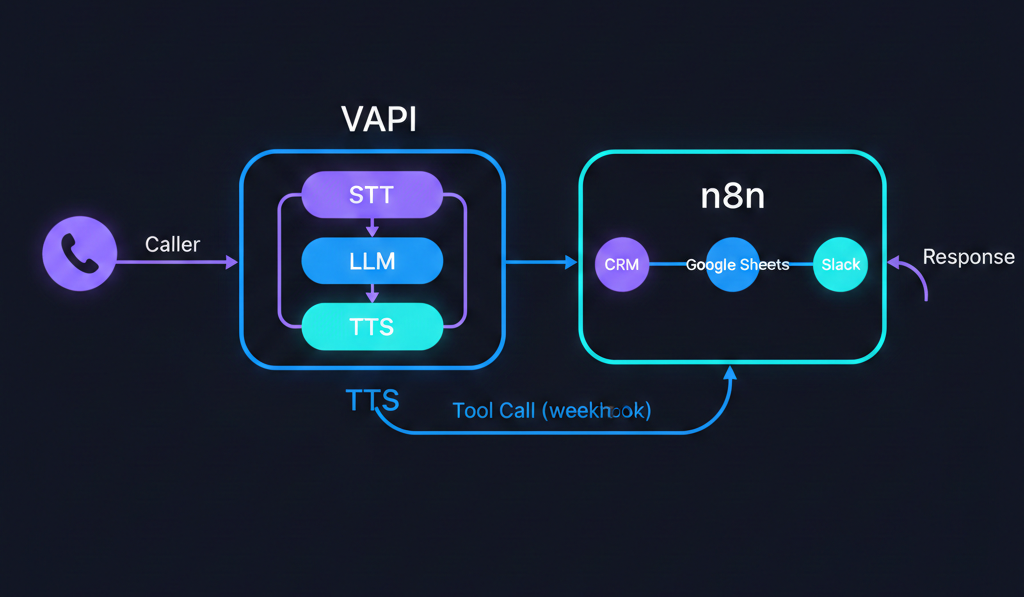
- Caller speaks: "Hi, I'm interested in your consulting services."
- VAPI STT: Deepgram transcribes the audio to text in real time (sub-500ms latency).
- LLM processes: GPT-4o (or your chosen model) reads the transcript, considers the system prompt and conversation history, and generates a response. If the LLM determines it needs external data or needs to take an action, it generates a tool call instead of a direct response.
- Tool call hits n8n: VAPI sends an HTTP request to your n8n webhook with the tool name and arguments (e.g.,
capture_leadwithname: "Sarah",email: "sarah@company.com"). - n8n executes business logic: The workflow runs: writes to Google Sheets, creates a HubSpot contact, sends a Slack notification, checks a calendar, whatever you've configured.
- n8n returns data: The webhook responds with the result (e.g.,
{ "status": "success", "next_available": "Thursday 2pm" }). - LLM responds: The model incorporates the returned data into its next response: "Great news, Sarah, I've got you down. Our next available slot is Thursday at 2pm. Does that work for you?"
- VAPI TTS: ElevenLabs converts the text response to natural-sounding speech.
- Caller hears the response: The entire round trip takes 1-3 seconds.
This loop repeats for every turn in the conversation. The caller never knows they're talking to an AI workflow, it sounds like a knowledgeable receptionist who happens to have instant access to every system in your business.
Step 1: Create Your VAPI Account and Get API Keys
Head to vapi.ai and sign up. VAPI gives you $10 in free credits, which is enough for about 200 minutes of testing at their base rate.
Once you're in the dashboard:
- Go to Organization Settings (bottom-left gear icon)
- Copy your Public Key and Private Key: you'll need the private key for API calls and the public key for web-based testing
- Navigate to Phone Numbers and either import a Twilio number or buy one directly through VAPI
VAPI pricing is usage-based: $0.05/minute for the base platform, plus the cost of your chosen STT, LLM, and TTS providers. A typical call using Deepgram + GPT-4o + ElevenLabs runs about $0.10-$0.15/minute all-in. At scale, that's significantly cheaper than a human agent.
Step 2: Create an Assistant in VAPI
An "assistant" in VAPI is your voice agent's configuration, its personality, its brain, and its voice. Go to the Assistants tab and create a new one.
System Prompt
This is the most important part. The system prompt defines who your agent is, how it behaves, and what it can do. Here's a template:
You are Sarah, a friendly and professional receptionist for Acme Consulting.
Your job is to answer incoming calls, understand what the caller needs, and
collect their information so the right team member can follow up.

BEHAVIOR:
- Be warm but concise. Don't ramble.
- Ask one question at a time. Never stack multiple questions.
- If someone asks something you don't know, say "Let me connect you with
  someone who can help with that", never make up an answer.
- Always confirm details before submitting: "Just to confirm, your name is
  [name] and your email is [email], correct?"

INFORMATION TO COLLECT:
- Full name
- Email address
- What they're looking for (brief description of their need)
- Preferred callback time (if applicable)

Once you've collected all the information, use the capture_lead tool to save it.
Then let the caller know that someone from the team will follow up within 24 hours.
A few things to note about voice agent prompts versus chatbot prompts:
- Keep it conversational. People don't talk to voice agents the way they type to chatbots. Your system prompt should produce responses that sound natural when spoken aloud.
- One question at a time. In a chat interface, you can ask three questions in one message. On a phone call, that's overwhelming. Train the agent to ask, wait, then ask the next question.
- Short responses. Aim for 1-2 sentences per turn. Long monologues cause callers to hang up.
Model Selection
VAPI supports multiple LLM providers. For most use cases:
- GPT-4o: Best balance of speed and intelligence. This is what we recommend for production voice agents.
- GPT-4o-mini: Faster and cheaper, but less capable on complex reasoning. Good for simple Q&A agents.
- Claude 3.5 Sonnet: Strong alternative, especially for agents that need nuanced conversation handling.
Latency matters more for voice than for chat. Every extra second the LLM takes to respond is a second of dead air on the phone call. GPT-4o currently hits the best latency-to-quality ratio for voice use cases.
Voice Selection
VAPI integrates with multiple TTS providers. ElevenLabs is the default and produces the most natural-sounding voices. You can choose from their library or clone a custom voice.
Pick a voice that matches your brand. A law firm doesn't want a bubbly 20-something voice. A kids' activity center doesn't want a deep corporate baritone. Test a few options by running sample calls in the VAPI dashboard.
Step 3: Set Up Your n8n Workflow
Now for the business logic. You need an n8n instance, either n8n Cloud (starts at $20/month) or self-hosted on your own server.
Create a new workflow and add a Webhook node as the trigger:
- Add a new node and search for "Webhook"
- Set the HTTP method to POST
- Set Authentication to None for now (we'll secure it later)
- Copy the Production URL: this is what VAPI will call
Your webhook URL will look something like:
https://your-n8n-instance.app.n8n.cloud/webhook/vapi-lead-capture
Important: make sure your workflow is active (toggled on in n8n) before testing. Inactive workflows don't respond to webhook calls.
Step 4: Configure VAPI Tool Calls
Back in VAPI, go to your assistant's configuration and scroll to the Tools section. This is where you define what actions your agent can take.
Add a new tool with this configuration:
{
  "type": "function",
  "function": {
    "name": "capture_lead",
    "description": "Save a new lead's contact information and inquiry details. Call this after collecting the caller's name, email, and what they need help with.",
    "parameters": {
      "type": "object",
      "properties": {
        "name": {
          "type": "string",
          "description": "The caller's full name"
        },
        "email": {
          "type": "string",
          "description": "The caller's email address"
        },
        "intent": {
          "type": "string",
          "description": "What the caller is looking for, summarized in one sentence"
        }
      },
      "required": ["name", "email", "intent"]
    }
  },
  "server": {
    "url": "https://your-n8n-instance.app.n8n.cloud/webhook/vapi-lead-capture"
  }
}
The description field is critical, the LLM reads it to decide when to call this tool. Be specific about when the tool should be used and what data it needs. Vague descriptions lead to the agent calling tools at the wrong time or with missing data.
You can define multiple tools: one for lead capture, one for appointment booking, one for FAQ lookup, one for transferring the call. Each tool maps to a separate n8n webhook (or the same webhook with different routing logic).
Step 5: Build the n8n Lead Capture Workflow
Now let's build the actual workflow that runs when VAPI calls the capture_lead tool. Here's the flow:
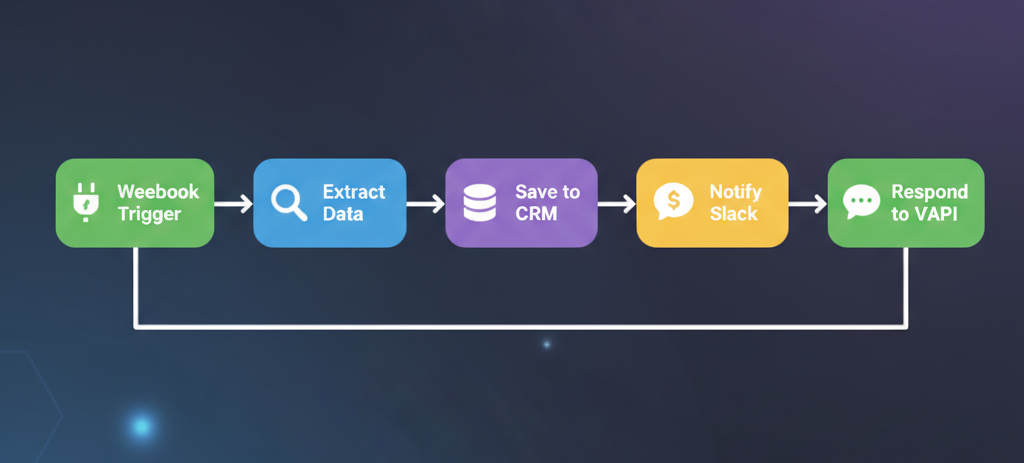
Node 1: Webhook (Trigger)
Already configured in Step 3. When VAPI calls this webhook, the incoming payload contains the tool call arguments under message.toolCallList[0].function.arguments.
Node 2: Extract Data
Add a Set node to pull the relevant fields from the VAPI payload:
name={{ $json.message.toolCallList[0].function.arguments.name }}email={{ $json.message.toolCallList[0].function.arguments.email }}intent={{ $json.message.toolCallList[0].function.arguments.intent }}timestamp={{ $now.toISO() }}call_id={{ $json.message.call.id }}
Node 3: Google Sheets (or CRM)
Add a Google Sheets node to append a row to your lead tracking spreadsheet:
- Operation: Append Row
- Spreadsheet: Select your lead tracking sheet
- Sheet: "Leads"
- Columns: Map
name,email,intent,timestamp, andcall_idto the corresponding columns
If you're using a CRM instead, HubSpot, Salesforce, Pipedrive, n8n has native nodes for all of them. Replace the Google Sheets node with your CRM node and map the same fields.
Node 4: Slack Notification (Optional)
Add a Slack node to ping your team when a new lead comes in:
- Channel:
#new-leads - Message:
New voice lead: {{ $json.name }} ({{ $json.email }}), "{{ $json.intent }}"
Node 5: Respond to Webhook
This is the step people forget. Add a Respond to Webhook node at the end of your workflow. VAPI expects a response from the tool call, the LLM uses this response to continue the conversation.
Set the response body to:
{
  "results": [
    {
      "result": "Lead saved successfully. The team will follow up within 24 hours.",
      "toolCallId": "{{ $json.message.toolCallList[0].id }}"
    }
  ]
}
The result string is what the LLM sees. It will use this information in its next spoken response to the caller. The toolCallId must match the original tool call ID from the VAPI payload so VAPI knows which tool call this response corresponds to.
Step 6: Test the Full Flow
VAPI has a built-in testing feature in the dashboard. Click the phone icon on your assistant to start a web-based test call. Talk to your agent, provide your details, and watch the n8n workflow execute in real time.
Here's what to test:
- Happy path: Give all required information cleanly. Verify the data shows up in Google Sheets/CRM and the Slack notification fires.
- Partial information: Give your name but dodge the email question. The agent should ask again, not skip it or call the tool with missing data.
- Edge cases: Spell out an unusual email address. Give a name with an apostrophe. Ask an off-topic question mid-conversation. See how the agent handles it.
- Latency: Time the gap between your question and the agent's response. Anything under 2 seconds is good. Over 3 seconds and callers start feeling the awkwardness.
If the tool call isn't firing, check three things: Is the n8n workflow active? Is the webhook URL correct in the VAPI tool configuration? Does the system prompt clearly instruct the agent when to use the tool?
Securing Your Webhook
Before going to production, add authentication to your n8n webhook. VAPI supports custom headers on tool calls, add a secret header like x-vapi-secret: your-random-secret-here to your tool configuration, then validate it in n8n using an IF node at the start of your workflow. Reject any requests that don't include the correct header.
Beyond Lead Capture: What Else You Can Build
The lead capture workflow is the starting point. Once you understand the VAPI tool call + n8n webhook pattern, you can build anything:
- Appointment booking: Tool call checks Google Calendar for availability via n8n, books the slot, sends a confirmation email
- Order status lookup: Caller provides an order number, n8n queries your database or Shopify API, returns the status
- FAQ with knowledge base: n8n queries a Notion database or vector store, returns the answer for the LLM to speak
- Call routing: Based on the caller's intent, n8n determines the right department and returns a transfer number, which VAPI uses to warm-transfer the call
- Follow-up scheduling: After the call, n8n triggers a delayed email sequence, creates a task in your project management tool, or schedules a follow-up call
Each of these is a separate VAPI tool + n8n workflow. A single assistant can have 5-10 tools, making it capable of handling complex, multi-step conversations.
VAPI Pricing and Alternatives
VAPI's pricing is transparent and usage-based. As of late 2025:
| Component | Cost |
|---|---|
| VAPI platform | $0.05/min |
| Deepgram STT | ~$0.01/min |
| GPT-4o | ~$0.03-$0.06/min (varies by conversation length) |
| ElevenLabs TTS | ~$0.03/min |
| Total per minute | $0.10-$0.15/min |
For context, a human receptionist costs $15-$25/hour, or roughly $0.25-$0.42/minute. A voice AI agent costs 70-90% less per minute and works 24/7.
VAPI isn't the only option in this space. Worth knowing about:
- Retell AI: Similar feature set to VAPI with a slightly different developer experience. Strong on latency optimization.
- Bland AI: Focused on outbound calling at scale. Better suited for sales teams doing high-volume outreach.
- Pipecat: Open-source framework for building voice agents. Maximum flexibility, but you manage the infrastructure yourself.
For a detailed comparison of these platforms, see our VAPI vs Retell vs Pipecat breakdown.
We use VAPI for most client projects because the tool calling system is mature, the documentation is solid, and the integration with external webhooks (like n8n) is seamless. If you need something highly custom or want full infrastructure control, Pipecat is worth evaluating.
Common Pitfalls
A few things that trip people up when building VAPI + n8n agents:
Latency stacking. Every node in your n8n workflow adds latency to the tool call response. If your workflow takes 5 seconds to execute, that's 5 seconds of dead air on the call. Keep workflows lean, do the minimum needed to respond, and move non-critical tasks (email sends, CRM enrichment) to a separate async workflow triggered after the call ends.
Overloading the system prompt. Voice agents need shorter, more focused system prompts than chatbots. A 2,000-word system prompt with 15 edge case instructions will confuse the model and slow down response times. Keep it under 500 words. Handle edge cases through tool logic in n8n, not prompt instructions.
Not handling tool call failures. If your n8n webhook is down, VAPI's tool call will fail. The LLM needs instructions for this scenario in the system prompt: "If a tool call fails, apologize and ask the caller if you can take their information manually." Without this, the agent freezes or hallucinates.
Ignoring call recordings. VAPI records every call by default. Listen to the first 20-30 calls. You'll find issues that testing didn't catch, awkward phrasing, misunderstood names, tool calls firing at the wrong moment. This feedback loop is how you go from "working demo" to "production-ready agent."
What's Next
You now have a working voice AI agent that answers phone calls, has natural conversations, and executes real business logic through n8n workflows. The setup is modular, swap out the LLM, change the voice, add new tools, modify workflows, without rebuilding anything from scratch.
The gap between "demo that impresses your cofounder" and "system that handles 500 calls a day" is primarily in the details: error handling, fallback logic, latency optimization, and continuous prompt tuning based on real call data. That's the work that takes a proof of concept to production.
If you want to skip the learning curve and get a production-grade voice agent deployed for your business, check out our voice AI services or reach out to us directly. At MM Intelligence (MMI), we build voice agents end-to-end, from system design and prompt engineering to n8n workflow automation and ongoing optimization. We'll tell you straight whether a voice agent makes sense for your use case and what it'll take to build one.