
WhatsApp AI Chatbots for Gulf Businesses (2026)
How to build a WhatsApp AI chatbot for Gulf businesses. Arabic support, WhatsApp Business API, costs, architecture, and common mistakes.

We work with clients across Bahrain, Saudi Arabia, and the UAE. Here's how to build AI for that reality.
In the Gulf, business happens on WhatsApp. Not email. Not contact forms. Not support tickets. WhatsApp.
Most Gulf businesses already know this. They have someone on the team, sometimes the owner, manually responding to WhatsApp messages all day. It works until it doesn't. Leads pile up overnight. Response times slip. Messages get missed during prayer times and weekends. Scaling means hiring more people to sit on their phones.
The fix isn't more staff. It's an AI-powered WhatsApp chatbot that handles the first conversation, qualifies the lead, answers common questions, and routes the right opportunities to your team, in Arabic and English, 24 hours a day.
This guide covers exactly how to build one.
Why WhatsApp Dominates Gulf Business Communication
The numbers aren't subtle. WhatsApp penetration in the UAE sits above 96%. Saudi Arabia is over 90%. Qatar, Bahrain, Kuwait, all in the same range. Across the GCC, WhatsApp is the default messaging app for both personal and business communication.
This isn't a technology preference. It's a cultural one. Gulf business culture favors direct, relationship-driven communication. People want to message a person (or what feels like a person), not navigate a website.
Here's what makes WhatsApp uniquely powerful in this region:
- Voice messages are the norm. Gulf users send voice notes constantly, it's faster than typing, especially in Arabic. Any serious WhatsApp strategy needs to account for this.
- Group chats drive B2B. Business deals, vendor coordination, and project management regularly happen in WhatsApp groups.
- Trust is tied to the platform. A message from a verified WhatsApp Business account carries more weight than a web form or email.
- It spans every demographic. From C-suite executives to laborers, everyone uses WhatsApp. Your chatbot reaches the entire market through one channel.
The opportunity: take the channel your customers already prefer and make it intelligent. Instead of a human responding to every "How much does this cost?", an AI handles the routine and escalates the complex.
WhatsApp Business API: What You Actually Need
There are two versions of WhatsApp for businesses, and the difference matters.
WhatsApp Business App is the free version. You download it, set up a business profile, and manually respond to messages. It works for a solo operation handling 20-30 conversations a day. But it can't connect to AI, can't automate responses programmatically, and caps out at around 5 devices. If you're reading this guide, you've outgrown it.
WhatsApp Business API is the programmatic version. No interface of its own, it's an API your software connects to. This is what powers AI chatbots, automated notifications, and large-scale customer communication.
To access the API, you go through a Business Solution Provider (BSP): companies authorized by Meta to provide API access. The major ones:
- Twilio: most developer-friendly, strong in the Middle East
- 360dialog: popular in the region, competitive pricing, good Arabic support
- MessageBird (Bird): solid platform, recently rebranded
- Respond.io: built for conversational commerce, strong in APAC and Middle East
- WATI: designed for small-to-mid businesses, easy setup
Key Concepts You Need to Know
Template messages are pre-approved message formats you send to initiate conversations. WhatsApp reviews and approves these before you can use them. Think: appointment reminders, order confirmations, shipping notifications. You can't blast promotional messages without approval, WhatsApp will shut you down.
Session messages are free-form messages exchanged within a 24-hour window after a customer messages you. During that window, your AI chatbot can send anything, text, images, documents, AI-generated responses.
The 24-hour window is the critical rule. Customer sends a message, a session opens. After 24 hours of inactivity, it closes. To message the customer again, you need an approved template. This is WhatsApp's anti-spam mechanism, and violating it gets your number banned.
What an AI WhatsApp Chatbot Can Do
Once your WhatsApp Business API is connected to an AI backend, here's what becomes possible:
Instant responses, 24/7. The Gulf spans multiple time zones. An AI chatbot responds in seconds at 3 AM on a Friday just as well as 10 AM on a Tuesday. No more lost leads because nobody was awake to reply.
Lead qualification. The chatbot asks the right questions, budget, timeline, requirements, location, collects the information, scores the lead, and routes qualified prospects to your sales team with full context.
Appointment booking. "I'd like to schedule a meeting" triggers a tool call that checks your calendar, offers available slots, and confirms the booking. The customer never leaves WhatsApp.
Product catalog browsing. WhatsApp supports rich media, images, documents, links. Your chatbot can share product photos, PDFs, and pricing sheets directly in the conversation.
Order status and tracking. Integrate with your order management system and customers get real-time updates. "Where's my order?" gets an actual answer, not a link to a tracking page.
FAQ handling. Every business has the same 30-50 questions that consume 80% of support time. The AI handles them accurately, every time, without fatigue.
Bilingual conversations, Arabic and English. This is the big one. Your chatbot detects the customer's language and responds accordingly. If someone starts in Arabic and switches to English mid-conversation, the AI follows. If someone writes in Gulf Arabic mixed with English words, extremely common, the AI understands and responds naturally.
Arabic AI Capabilities in 2026
Two years ago, Arabic AI support was mediocre. Today it's genuinely good. Here's where things stand.
Large language models handle Arabic well. GPT-4o and Claude both demonstrate strong Arabic comprehension and generation. They handle Modern Standard Arabic (MSA) fluently and have significantly improved on Gulf dialect, Emirati, Saudi, Qatari, Kuwaiti, and Bahraini variants. They understand transliterated Arabic (Franco-Arabic) and code-switching between Arabic and English in the same sentence.
Voice message processing works. Arabic speech-to-text has improved dramatically. Whisper (OpenAI), Deepgram, and Google Cloud Speech-to-Text handle Gulf Arabic accents with high accuracy. Your chatbot can receive a voice message, transcribe it, process it with the LLM, and respond with text or a generated voice note.
RTL text handling is solved. Right-to-left rendering in WhatsApp is native. The AI generates Arabic text, WhatsApp displays it correctly. No special handling needed.
Cultural nuance matters and is achievable. A well-prompted AI chatbot can:
- Open with appropriate greetings (السلام عليكم) and respond in kind
- Adjust formality based on context, formal for business inquiries, conversational for casual questions
- Recognize Islamic calendar references and religious occasions
- Understand local business customs, Thursday/Friday weekends in some countries, different working hours during Ramadan
- Handle honorifics and titles correctly
This isn't automatic, you build it into the system prompt and conversation design. But the underlying models are capable of it.
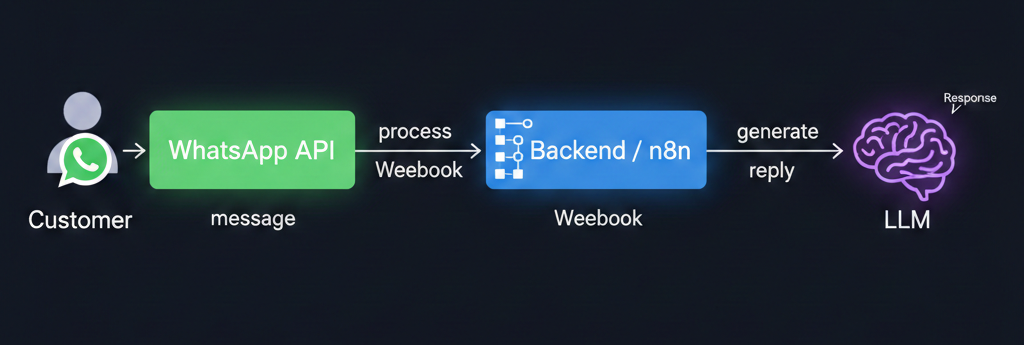
Architecture: How to Build It
The technical architecture is straightforward. Here's the stack:
WhatsApp Business API (via BSP) receives and sends messages. When a customer sends a message, the BSP forwards it to your webhook.
Your backend receives the webhook and processes the message. Options:
- n8n: visual workflow builder, handles webhooks and integrations natively. (We covered n8n in our VAPI + n8n voice agent tutorial, the same principles apply to WhatsApp.)
- Custom Node.js / Python backend: more control, required for high-volume deployments
- Serverless functions (AWS Lambda, Google Cloud Functions), scales automatically
LLM layer (OpenAI GPT-4o, Anthropic Claude, or similar) processes the conversation. Your backend sends message history and system prompt to the LLM. If the LLM needs to take an action, it generates a tool call that your backend executes.
Integrations connect to your business systems, CRM, calendar, order management, payments, whatever your chatbot needs access to.
The flow: Customer sends message -> BSP forwards to your webhook -> backend sends conversation history + system prompt to LLM -> LLM generates response (or a tool call that your backend executes) -> response goes back through BSP to WhatsApp.
Round-trip latency: typically 2-5 seconds for text, longer if tool calls are involved. For WhatsApp, this is perfectly acceptable, users don't expect instant typing indicators like they would on web chat.
Cost Breakdown
Here's what you're actually looking at financially:
WhatsApp API Costs
WhatsApp uses conversation-based pricing. One conversation is a 24-hour messaging session. Costs vary by category and country:
| Conversation Type | Cost (GCC region) |
|---|---|
| Marketing | $0.05 - $0.08 per conversation |
| Utility (order updates, confirmations) | $0.02 - $0.04 per conversation |
| Service (customer-initiated) | $0.02 - $0.03 per conversation |
| Authentication (OTP, verification) | $0.02 - $0.03 per conversation |
For a business handling 1,000 customer-initiated conversations per month, that's roughly $20-$30/month in WhatsApp fees. Marketing messages cost more, sending 1,000 promotional template messages runs $50-$80.
BSP Fees
Your Business Solution Provider charges for API access and infrastructure:
- Low end: $0-$50/month (360dialog, some plans)
- Mid range: $100-$300/month (Twilio, standard plans)
- High end: $300-$500/month (enterprise tiers with SLAs and dedicated support)
Some BSPs charge per message on top of the WhatsApp fees. Read the pricing page carefully.
LLM Costs
People overestimate this. A typical WhatsApp conversation is 5-15 messages. Using GPT-4o, that's roughly $0.01-$0.05 per conversation. At 1,000 conversations/month: $10-$50/month for LLM processing.
Development Costs
| Approach | Cost | Timeline |
|---|---|---|
| n8n-based build (simpler logic) | $5,000 - $10,000 | 2-4 weeks |
| Custom backend (full-featured) | $10,000 - $20,000 | 4-8 weeks |
| Enterprise (multi-language, integrations, analytics) | $20,000 - $50,000 | 2-4 months |
Total Monthly Running Cost
For a mid-size Gulf business running 1,000-3,000 conversations/month:
- WhatsApp fees: $40-$150
- BSP: $50-$300
- LLM: $20-$100
- Hosting/infrastructure: $20-$50
- Total: $130-$600/month
Compare that to a full-time employee handling the same conversations manually at $3,000-$5,000/month, and the ROI is obvious.
Common Mistakes to Avoid
We've seen these enough times to call them out specifically.
Not getting verified. The green checkmark on your WhatsApp Business profile signals legitimacy. In a region where trust and reputation are paramount, an unverified account looks suspicious. Apply for verification through your BSP immediately, it requires a Meta Business Manager account and can take 1-2 weeks.
Spamming template messages. WhatsApp monitors quality scores. Too many blocks or reports and your messaging limits get restricted, then your number gets banned. This happens constantly to businesses that treat WhatsApp like an email blast tool. Marketing templates go to opted-in contacts only.
English-only in an Arabic market. We still see this. A chatbot that only responds in English alienates a significant portion of your customer base. Build bilingual from day one, the LLM handles it with the right system prompt.
Ignoring voice messages. A large percentage of Gulf WhatsApp messages are voice notes. If your chatbot can't process them, it silently fails on a huge chunk of inbound communication. Implement speech-to-text on incoming audio, Whisper charges fractions of a cent per minute.
Not handling the 24-hour window. Your chatbot collects a lead at 8 PM. Sales follows up at 10 AM, but the session expired. Now they need a template message, which feels impersonal. Design your system to respond within the window or use well-crafted templates for follow-ups.
Treating all Gulf markets as identical. UAE, Saudi, Qatar, Bahrain, and Kuwait share a language and religion, but business culture varies. Working hours differ. Regulatory requirements differ (Saudi has specific data residency rules). A bot built for Dubai may need adjustments for Riyadh.
Getting Started: Your Launch Plan
Here's the practical path from zero to a live WhatsApp AI chatbot:
Week 1: Foundation. Register for a WhatsApp Business API account through a BSP (Twilio or 360dialog are solid starting points). Apply for business verification immediately, it takes 1-2 weeks.
Week 2: Design the conversation. Map out the 10-15 most common customer inquiries. Write the system prompt, language instructions, tone guidelines, business information, and the actions the bot should handle (lead capture, FAQ, appointment booking).
Week 3: Build and integrate. Set up your backend (n8n for simplicity, custom code for complexity). Connect to the WhatsApp API via webhook. Integrate your LLM. Build tool calls for calendar booking, CRM entry, product lookup. Test extensively in both Arabic and English.
Week 4: Test with real users. Give your number to 10-20 trusted contacts. Have them test in Arabic, English, and mixed. Send voice messages. Ask edge-case questions. Try to break it. Fix what breaks.
Week 5: Go live. Add the WhatsApp number to your website, business cards, and Google Business profile. Start with customer-initiated conversations only, no marketing templates until you've validated the experience.
After launch, monitor conversations daily for two weeks. Look for unanswered questions, failed tool calls, and language issues. Iterate based on what customers actually ask.
The Bottom Line
WhatsApp AI chatbots aren't a future trend in the Gulf, they're a current competitive advantage. The technology is ready, Arabic language models are capable, the API is mature, and the cost is reasonable.
The only question is whether you build it now or wait until your competitors do it first.
If you're ready to add AI to your WhatsApp business communication, get in touch. We build WhatsApp AI chatbots for Gulf businesses, bilingual, integrated with your systems, and designed for how business actually works in this region.